
Create blank images in Power Automate
There are a number of scenarios where a developer may need to create blank images in Power Automate.
A couple which come to mind offhand are:
- you need to replace an image with a transparent or blank image
- you downloading data from a Dataverse image column, but it’s empty because no image was uploaded or stored
- you’re populating a Word or PDF template that has an image placeholder, and you need that placeholder to be blank
.
This post will detail how to create blank images in Power Automate, and assumes some basic Power Automate familiarity.
Ready? Here we go!
For those who want to skip the foreplay and see the general steps, here they are:
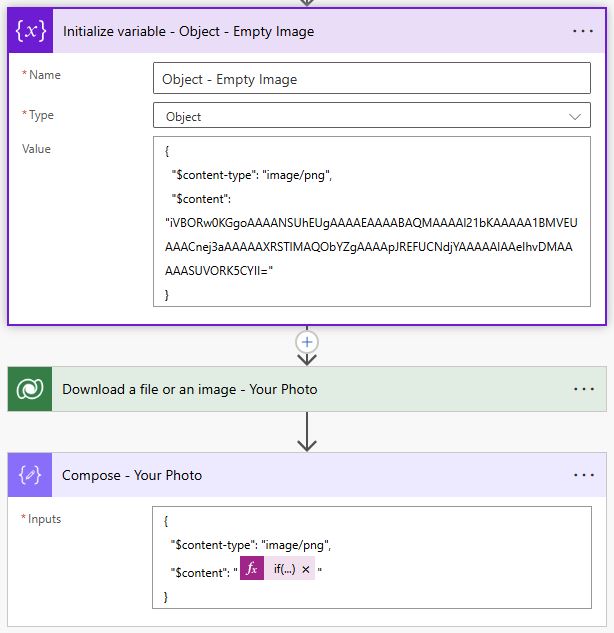
The important details
Create the following 3 flow actions when querying a table in the Dataverse:
- Initialize Variable – where you’ll create the empty image as an object
- Download a file or an image
- Compose – where you’ll check the image data downloaded from the step above, and replace it with the blank image
Once complete, here is each action step in the workflow:
1) “Initialize Variable” Action
Create your variable, and use the following code to create a 1×1 transparent pixel png:
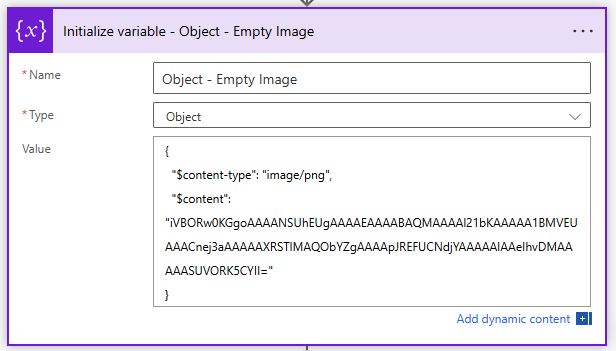
The code so you can easily copy/paste:
|
1 2 3 4 |
{ "$content-type": "image/png", "$content": "iVBORw0KGgoAAAANSUhEUgAAAAEAAAABAQMAAAAl21bKAAAAA1BMVEUAAACnej3aAAAAAXRSTlMAQObYZgAAAApJREFUCNdjYAAAAAIAAeIhvDMAAAAASUVORK5CYII=" } |
If you need to create a jpg file instead of a png file, just replace “image/png” with “image/jpeg”.
Here’s an online base64 encoded image viewer to view the image generated from the above code:
https://jaredwinick.github.io/base64-image-viewer/
2) “Compose” Action
Use a compose action to provide the object definition with an inline conditional statement to check if the dataverse imnage download had data and if not, replace it with the blank image:

The code so you can easily copy/paste:
|
1 2 3 4 5 |
if( empty(outputs('Download_a_file_or_an_image_-_Your_Photo')?['body']), outputs('Initialize_variable_-_Object_-_Empty_Image')?['body'], base64(outputs('Download_a_file_or_an_image_-_Your_Photo')?['body']) ) |
That’s all that is needed to Create blank images in Power Automate
Hopefully straight forward enough, and easily adaptable to fit your specific needs.
Happy Power Automate building!
Please leave comments if you have any Power Automate tricks or tips of your own to share!