
Nintex Cloud – How to get values from Nintex People Picker Control on Cloud Task Forms
When using Nintex Cloud, there is no out of the box method to obtain the Nintex People Picker control values.
For example, suppose:
- you have a SharePoint Online form users submit that assigns a task
- the process of the form submission activates a workflow that involves completing a task
- in order for the user to complete the task properly, they need to select at least one user from the People Picker Control
Unlike other controls on task forms, there is no single one-step ability to grab the users selected. However, rest assured! It is quite easy to implement and won’t take a lot of development time. Unless you have a lot of task forms with numerous controls.
This post will detail the step-by-step process to follow. Basically, in three steps, you can modify your cloud workflows to gain access to the values selected.
For this example, the Nintex People Picker Control on the Task form is called “Tier 4 Manager” :

Ready? Here we go!
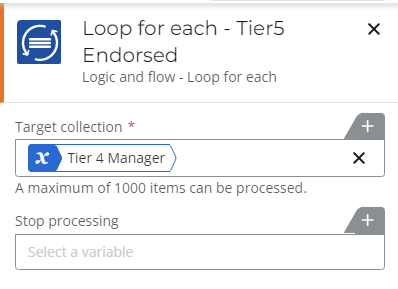
1) loop through each value, even if multiple values are not allowed in the control, so you can access the current value as an object:
2) Retrieve the email address property value. The User ID will probably work too, but I chose email :

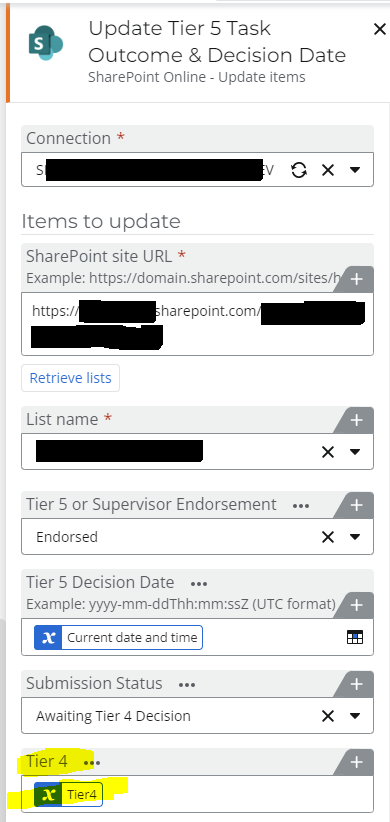
3) Update the relevant People/Group List column. In this case, the List column was also called “Tier 4”:
That’s all there is to getting the Nintex People Picker Control values on the Cloud Task Forms!
A little time consuming but overall – simple, right?
Happy Nintex Automation Cloud building!
Please leave comments if you have any Nintex tricks or tips of your own to share!